

Cables Blog
Shop Cables for Sale:
Fiber Optic Cables •
Network Cables •
Outdoor Cables •
Bulk Ethernet Cables •
Cat6 Cables •
Cat5 Cables •
Cat5e Cables •
Crypto Cables •
Data Center Cables
How Far Can You Run Cat6 Cable? Maximum Lengths and Real-World Limits
Find out how far Cat6 Ethernet cables can run before signal loss affects your network.
Find out how far Cat6 Ethernet cables can run before signal loss affects your network. Expert guidance on installation, speed, and PoE for reliable long runs.
by Vikas Dayal • March 31, 2026
When you are wiring a data center, installing a complex audio-visual system, or setting up a high-performance network, reliability is not optional. Network administrators and trade specialists know that the physical infrastructure of a network dictates its ceiling for performance. One of the most common and critical questions in network planning is: how far can you run Cat6 cable before you start losing signal, dropping packets, or failing to power your devices?
Understanding the maximum distance for a Cat6 cable is not just about memorizing a single number. It requires understanding the relationship between data speed, copper quality, environmental factors, and industry standards. Whether you are connecting a single user to a switch or running backbone cabling through an industrial facility, planning your network cable run properly ensures your system functions exactly as intended.
Here, we will explain the maximum reliable run length for Category 6 (Cat6) and Category 6a (Cat6A) Ethernet cables, the science behind signal degradation, and exactly what you need to do if your installation requires distances beyond the standard limitations.
The Short Answer: Cat6 Cable Length Limits Explained
For those who need the standard industry specifications immediately, the maximum lengths for Cat6 Ethernet cable depend entirely on the network speeds you are trying to push through them.
Here are the strict rules defined by the Telecommunications Industry Association (TIA) and the Electronic Industries Alliance (EIA):
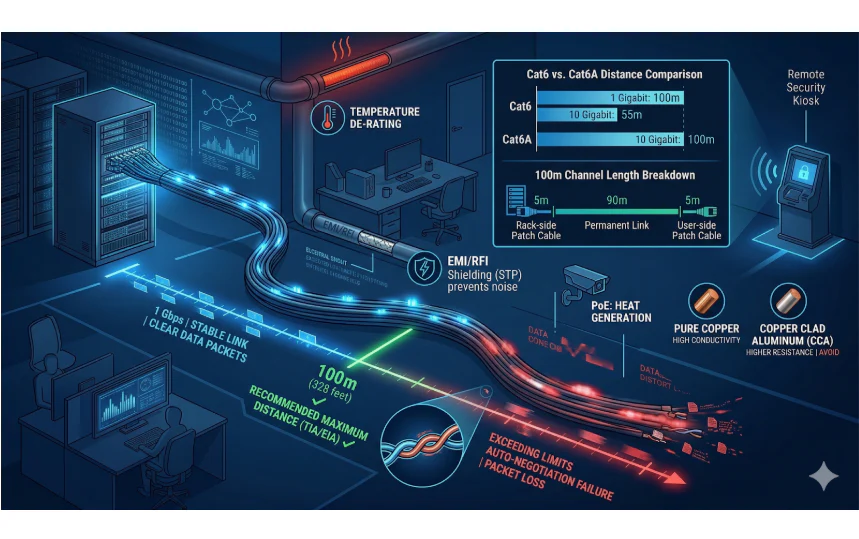
- For 10/100/1000 Mbps (Up to 1 Gigabit) Speeds: The maximum Cat6 cable run length is 100 meters, which translates to 328 feet.
- For 10 Gbps (10 Gigabit) Speeds: The maximum Cat6 cable run length drops significantly to 55 meters, which translates to 180 feet. If the cabling is in a highly congested area with high alien crosstalk, this distance can drop further to 37 meters (121 feet).
These limits are not arbitrary. They are physical limitations based on how electrical signals travel over twisted copper wire. When a signal travels down a copper cable, it naturally loses strength—a phenomenon known as attenuation. At the same time, the signal must compete with internal electrical noise (crosstalk) and external interference. The 328-foot limitation ensures that the signal arrives at the receiving end with enough strength and clarity to be accurately decoded by the networking equipment.
Understanding the 328-Foot (100-Meter) Rule in Practice
When IT professionals and data center managers talk about the 328-foot (100-meter) limit, they are referring to what is known as the "channel length." It is a common mistake for novice installers to assume they can run a single solid 328-foot cable through the walls and then plug additional cables into the wall jacks.
The 100-meter channel limitation encompasses the entire connection from the network switch to the end device (such as a computer, IP camera, or wireless access point).
Industry standards recommend breaking this 100-meter channel down into two specific segments:
- The Permanent Link (90 meters / 295 feet): This is the solid copper cable installed in the walls, ceilings, or conduit. It runs from the patch panel in the server room to the wall jack or termination point in the user area. Solid copper is used here because it holds a signal better over long distances and is less susceptible to attenuation.
- The Patch Cables (10 meters / 33 feet total): This covers the stranded copper cables used to connect the equipment to the permanent link. Stranded cable is more flexible and can handle being moved or bent, but it has higher attenuation. This 10-meter allowance is usually split between the patch cord at the network rack and the patch cord at the user's desk.
If your permanent link exceeds 295 feet, or if your combined permanent link and patch cables exceed 328 feet, you violate the TIA/EIA standards and risk network instability.
Factors That Affect Your Maximum Ethernet Cable Distance
While 328 feet is the theoretical maximum under ideal conditions, real-world environments are rarely ideal. Several physical and environmental factors can severely restrict how far your Cat6 cable can effectively run.
1. Network Speed and Bandwidth Demands
As mentioned earlier, the frequency at which data is transmitted heavily impacts the distance it can travel. Cat6 operates at a frequency of 250 MHz. When pushing 1 Gigabit per second (Gbps), the signal is robust enough to reach the full 100 meters. However, pushing 10 Gbps requires much more bandwidth. The higher frequency signals degrade faster, which is why 10 Gigabit speeds over standard Cat6 are restricted to just 55 meters (180 feet).
2. Power over Ethernet (PoE) Requirements
Modern networks rely heavily on Power over Ethernet (PoE) to operate devices like VoIP phones, security cameras, and Wi-Fi access points. Sending electrical current alongside data generates heat within the cable jacket.
- Heat increases the DC resistance of the copper.
- Increased resistance leads to voltage drops over long distances.
- If the cable run is too long, the powered device may not receive enough wattage to turn on, or it may reboot sporadically under heavy load. When running high-power PoE (like PoE++ / 802.3bt), you must factor in heat dissipation, especially if cables are bundled tightly together in cable trays.
3. Conductor Quality: Pure Copper vs. CCA
Not all Cat6 cables are manufactured to the same professional standards. The quality of the copper directly dictates the reliability of the run.
- Bare Pure Copper: This is the only type of cable that meets true UL listing and TIA standards. It offers the lowest electrical resistance, making it mandatory for long runs and PoE applications.
- Copper Clad Aluminum (CCA): These are bargain-bin cables made mostly of aluminum with a thin copper coating. Aluminum has a much higher electrical resistance than copper. CCA cables will often fail to carry a Gigabit signal even at 150 feet, and they represent a massive fire hazard when used for PoE due to overheating. Never use CCA for professional infrastructure.
4. Wire Gauge (AWG)
The American Wire Gauge (AWG) determines the thickness of the copper conductors. Cat6 cables typically use 23 AWG or 24 AWG wire. A lower number indicates a thicker wire. Thicker wires (23 AWG) have less electrical resistance than thinner wires (24 AWG). For maximum distance runs, especially those involving PoE, 23 AWG solid copper is the superior choice for maintaining signal integrity and minimizing power loss.
5. Shielding and Electromagnetic Interference (EMI)
If your cable run passes near fluorescent lights, industrial machinery, HVAC units, or parallel to high-voltage electrical lines, it will absorb electromagnetic interference.
- Unshielded Twisted Pair (UTP): Sufficient for standard office environments and home installations where electrical noise is minimal.
- Shielded Twisted Pair (STP): Features a foil shield around the twisted pairs to block EMI. If you are running cables in a factory, a hospital with MRI machines, or high-density data centers, shielded cables are necessary to prevent external noise from destroying your data packets over long distances.
6. Environmental Temperatures
Network cables installed in hot environments—such as non-temperature-controlled warehouses, factory ceilings, or outdoor conduits baking in the sun—experience higher attenuation. As the temperature of copper rises, so does its resistance. In extreme heat, network engineers must apply "de-rating" calculations, which means the maximum safe distance of the cable is reduced from 100 meters to account for the temperature increase.
Cat6 vs. Cat6A: Does the "A" Give You More Distance?
When infrastructure professionals plan for future-proofing, the conversation inevitably turns to Category 6A (Cat6A). The "A" stands for Augmented.
If your goal is simply reaching 328 feet at 1 Gigabit speeds, standard Cat6 is perfectly fine. However, if you need high-bandwidth performance over long distances, Cat6A is structurally superior.
Here is why data center managers and A/V installers opt for Cat6A:
- Full 100-Meter 10-Gigabit Support: Unlike standard Cat6, which limits 10 Gbps to 180 feet, Cat6A can carry a full 10 Gbps signal the entire 328 feet (100 meters).
- Higher Frequency: Cat6A operates at 500 MHz, double the bandwidth capacity of standard Cat6.
- Better Crosstalk Mitigation: Cat6A features tighter twists in the wire pairs and often includes thicker outer jackets or internal splines to physically separate the copper pairs, drastically reducing internal crosstalk.
If you are running cables for high-end digital signage, massive data server uplinks, or premium home theaters where uncompressed 4K/8K video is being transmitted via HDBaseT, Cat6A provides the headroom necessary to ensure flawless transmission over maximum distances.
What Happens If You Exceed the Maximum Run Length?
In some scenarios, users will try to stretch a Cat6 run to 350, 400, or even 500 feet. Because Ethernet protocols are highly resilient, a connection might temporarily light up on the switch, giving the false impression of success. However, exceeding the 328-foot limitation results in immediate, quantifiable network degradation.
If you violate the maximum length rules, you will encounter the following issues:
- Auto-Negotiation Failures: Network switches and computer network cards constantly "talk" to establish the highest stable speed. On an overly long cable, the switch will sense the poor signal quality and automatically downgrade the connection from 1 Gbps to 100 Mbps, or even 10 Mbps.
- Packet Loss and Latency: Data is sent in packets. If a packet arrives too distorted to read, the receiving device drops it and asks for it to be sent again. This causes severe lag, choppy audio on VoIP calls, and buffering on video streams.
- Complete Signal Drop-Outs: For high-stakes crypto-mining rigs or enterprise server environments, a dropped connection means lost revenue. A run that is too long will intermittently disconnect as the hardware struggles to maintain the link.
- PoE Failure: Devices simply will not power on, or they will enter a boot-loop because they receive just enough voltage to turn on, but not enough to stay on when the device attempts to draw power for operational tasks (like a camera moving its motorized lens).
How to Extend Your Network Beyond 328 Feet
When a warehouse floor plan or an outdoor security gate requires network connectivity at distances of 500 or 1000 feet, you cannot use a single continuous copper Ethernet cable. You must introduce active hardware or change the transmission medium entirely.
Here are the professional solutions for exceeding the Cat6 length limit:
1. Network Switches as Repeaters
The simplest way to extend a run is to place an active, powered network switch in the middle of the run.
- You can run 328 feet of Cat6 to a switch, and then run another 328 feet of Cat6 out from that switch to your device.
- Because the switch actively processes and regenerates the digital signal, it effectively resets the distance clock.
- Drawback: This requires a climate-controlled, secure location with an electrical outlet exactly where you need the intermediate switch.
2. PoE Extenders (Repeaters)
For IP cameras and wireless access points located far from the main building, PoE extenders are the standard choice.
- An inline PoE extender draws a small amount of power from the PoE switch to power itself, then passes the remaining data and power down the line.
- By daisy-chaining specific industrial-grade PoE extenders, installers can push data and power up to 2000 feet in some low-bandwidth scenarios.
- Drawback: Each hop reduces the total available wattage for the end device, so careful power-budget calculations are required.
3. Media Converters and Fiber Optic Cable
When you need to travel 500 feet, 1000 feet, or even several miles without sacrificing speed, copper must be abandoned in favor of light.
- A media converter transforms the copper Ethernet electrical signal into an optical light signal.
- You run a long strand of fiber optic cable (which is immune to EMI and attenuation over short distances) to the destination.
- At the destination, a second media converter changes the light back into an electrical Ethernet connection.
- Benefit: Single-mode fiber can transmit 10-Gigabit data over 6 miles (10 kilometers) with zero signal loss. This is the ultimate, professional-grade solution for connecting separate buildings or remote facility gates.
4. Specialized Long-Reach Copper Cabling
Innovations in cable manufacturing have introduced specialized Ethernet cables, often referred to as "GameChanger" cables, designed specifically for extending standard limits. By utilizing 22 AWG copper (thicker than standard 23 or 24 AWG) and optimized twisting ratios, these specialized cables can push 1 Gbps and PoE out to roughly 650 feet (200 meters) without repeaters. These are highly specific, premium products primarily used by specialized A/V and security trade professionals who want to avoid the cost of fiber splicing.
Practical Tips for a Successful Long-Distance Cat6 Installation
To guarantee maximum performance and ensure your cabling reaches its full potential distance without failure, professional installation practices must be followed.
Keep the following rules in mind for long cable runs:
- Avoid Tight Bends: Cat6 cable has a minimum bend radius (usually 4 times the cable diameter). Kinking the cable alters the internal geometry of the twisted pairs, ruining the crosstalk protection and shortening the effective distance.
- Never Pull with Excessive Force: Pulling cable through conduit with heavy machinery or excessive body weight stretches the copper, thinning it out. Thinner copper means higher resistance and shorter run lengths. Maximum pull tension is typically 25 pounds.
- Use Conduit for Outdoor Runs: If running cable underground or between buildings, use outdoor-rated, UV-resistant, gel-filled Direct Burial Cat6, and place it in PVC conduit to protect it from moisture and physical damage.
- Maintain Connector Quality: A chain is only as strong as its weakest link. Terminate your long runs into high-quality, 50-micron gold-plated RJ45 connectors and UL-listed patch panels. Poor terminations introduce massive signal loss right at the endpoint.
- Keep Away from Electrical Lines: If you must cross electrical power lines, do so at a 90-degree angle. Never run unshielded Cat6 parallel to standard AC power lines, as the magnetic field will induce noise and destroy data packets over long distances.
By respecting the 328-foot hard limit, understanding the specific speed and power requirements of your equipment, and using uncompromisingly high-quality solid copper cabling, you can build a network infrastructure that provides decades of flawless, uninterrupted service.